Skip to content
365Leads
Business card scanner for Microsoft 365

Snap the card. The lead is there.

You take a photo of the business card at your booth. About two minutes later the contact is ready in your team's list in Microsoft 365. Company researched, follow-up task with the person on the team who has time. No more typing in the evening.

  • Runs in your Microsoft 365
  • In the browser, nothing to install
  • We keep no contact data

Are you in management? Operations, privacy and billing

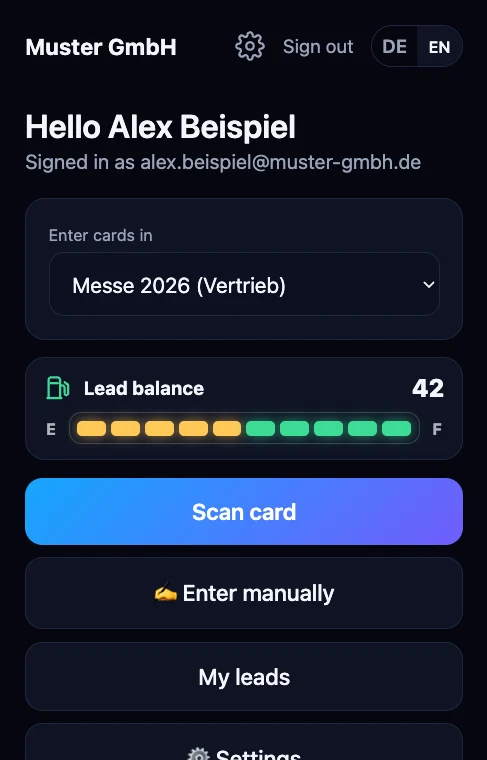
Start page of the app: channel »Messe 2026 (Vertrieb)«, lead balance as a fuel gauge and the »Scan card« button

The real app. Sample data of Muster GmbH.

At the booth

Four steps. You do three of them.

365Leads does the rest while you are already in the next conversation.

  1. Start page with the choice of where to enter cards

    Choose a channel

    Sign in with Microsoft and choose where the contacts belong. For example the trade show or the sales team.

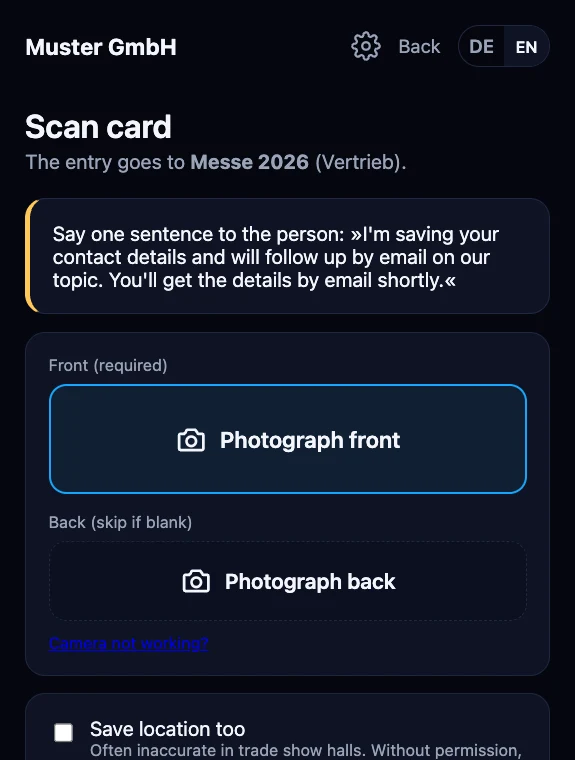
  2. »Scan card« page with the privacy sentence and the buttons for front and back

    Snap the card

    Front side, back side if needed. A short privacy sentence is shown on the screen, you simply say it.

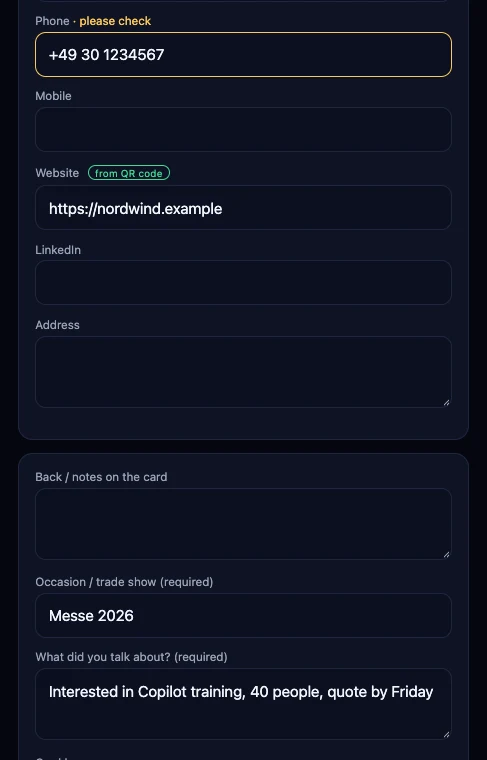
  3. Review page of the app: phone marked yellow with »please check«, website green from the QR code, occasion and the note »What did you talk about?« filled in

    Review and save

    The AI reads the card. Uncertain fields are yellow, data from the QR code is green. Add a few words on what you talked about, spoken if you like. The follow-up task starts with exactly that.

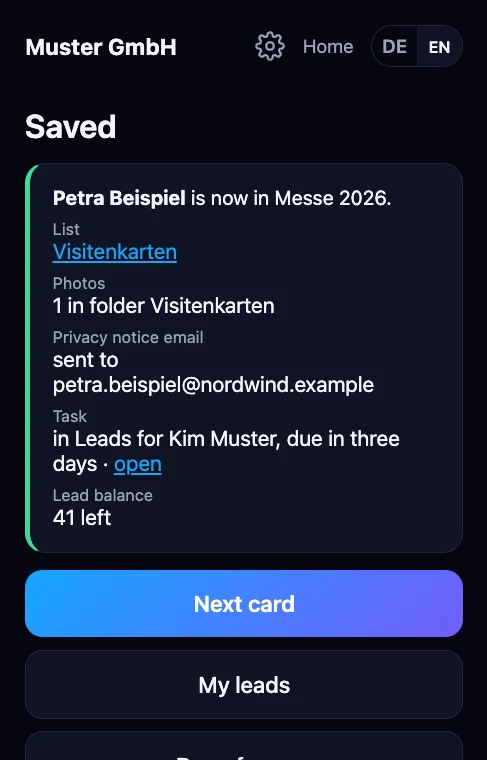
  4. »Saved« page: Petra Beispiel is now in Messe 2026, entry in the list, photo in the folder, privacy notice sent, task for Kim Muster, 41 leads left

    The lead is in the list

    In your team's SharePoint, with photo and company research. If you like, with a follow-up task for the person who has time and a privacy notice to the contact.

Follow-up

The task goes to whoever has time.

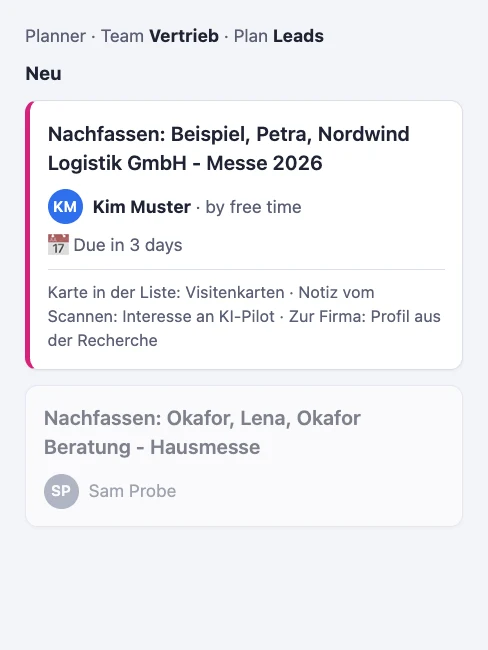
365Leads looks at your team's Outlook calendars and gives the follow-up task in Planner to the person with the most free working time in the next three working days. Nobody has to hand out leads, and none are left lying around.

  • Only free or busy: 365Leads sees no meeting details and stores nothing.
  • People who are out of office are skipped. Guests are never chosen, and your admin can exclude people such as management.
  • Open follow-up tasks in the plan count against free time. On a tie, it goes round-robin.
  • Your admin turns the feature on per channel. Without it, the task goes to a fixed person or to the person who captured the lead, as before.

List and Planner stay in sync. When your admin turns on sync, notes from the Planner task appear with name and time in the entry's history. Status, assignee and due date follow in both directions, every five minutes. Whoever checks the task off in Planner records the outcome in the app.

If your company has a works council, please agree on the feature with them before turning it on. The app points this out in the admin area.

Planner with the new follow-up task for Petra Beispiel, assigned to Kim Muster by free time, due in three days
The task in Planner, assigned by free time. Diagram, sample data, in German.
Setting per channel: »4. Assign by free time« turned on, note about the works council, Robin Leitung excluded
Your admin turns on assignment per channel and can exclude people.
»Saved« page: task in Leads for Kim Muster, due in three days
After saving, the person at the booth sees who will follow up. Sample data.
Three ways

No card at hand? No problem.

Not every conversation ends with a business card.

Snap the card

The standard way. If the card has a QR code, the app takes the data from it without errors.

Dictate after the conversation

Name, company, email and what it was about. The recording is turned into text on our own server and then discarded.

Enter manually

Too loud to talk? The same form, just empty. A name and one way to reach the person are enough.

What you no longer do

  • Type up cards in the eveningThe entry is created at the booth while the conversation is fresh.
  • Look up companies one by oneThe research runs in the background and shows up on the entry shortly after.
  • Maintain duplicate contactsIf your team already knows the person, the app adds to the existing entry.
  • Hand out follow-upsThe task in Planner goes to the person on the team whose calendar shows free time.
Calculator

What does typing cost you?

Use your own numbers. The values stay in your browser, they are neither sent nor stored.

Cards and conversations that should end up in your system
Typing, researching the company, entering it into the system, creating the follow-up
Optional. Wage including overhead
Rework per year
200.0 hours
Per trade show
50.0 h
Full working days (8 h)
25.0
Staff cost per year
€10,000

With 365Leads the entry is created at the booth. All that is left is a quick review before saving.

Sample values to start: 100 contacts, 4 trade shows, 30 minutes, 50 euros. This is a calculation aid, not a promise.

For management

Your contacts stay in your Microsoft 365.

For companies with 20 to 2,500 employees that actively use Microsoft 365 and collect contacts at trade shows and meetings. No big CRM, no server of your own.
Runs in your Microsoft 365

  • Contacts as entries in a list of your team in SharePoint, photos in the team's folder.
  • Sign-in with the Microsoft work account. No extra password, no installation.
  • No server and no Azure on your side. We run 365Leads in a data center in Frankfurt, with a separate, isolated instance per company.

Privacy by design

  • We hold no contact data. Our platform only counts leads, without names and without contact details.
  • Delegated permissions only: the app sees only what the signed-in person is allowed to see anyway.
  • Photo and voice recording only in memory. To read the card, the photo goes to an AI model that works on our behalf and does not use the data for training.
  • A privacy notice to every contact (Art. 13 GDPR), factual, no advertising. We are a processor under Art. 28 GDPR, with a contract.

Billing by lead packages

  • You pay for captured leads, not per trade show and not per user.
  • Every new contact counts as one lead. Additions to existing entries are free.
  • Packages are valid for 24 months. Every top-up extends your entire balance by another 24 months.
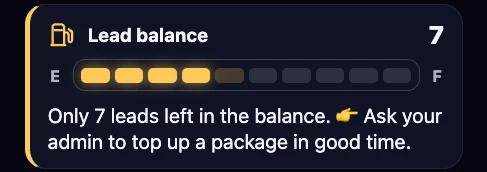
Lead balance fuel gauge in the app: low balance, warning light on, note to the admin to top up in time
Detail from the app, in German. Sample data.

Balance as a fuel gauge

Everyone sees the balance in the app. The warning light comes on in good time, and your admin sets the threshold. And the app never locks because something is wrong on our side: if the connection to our platform drops for a moment, your people simply keep capturing.

How to get started

1

Start 365Leads

One-time. Everything you need up to your first trade show:

  • Workshop, half a day, remote
  • Written setup plan: teams, roles, texts to your contacts
  • Setup runs automatically
  • Briefing for your people at the booth
  • Standby for your first trade show
€1,490
2

Lead packages

The bigger the package, the lower the price per lead.

LeadsPricePer lead
10€99€9.90
25€199€7.96
50€349€6.98
100€599€5.99
250€1,249€5.00
500€1,999€4.00
3

Introductory offer until December 31, 2026

Start 365Leads at list price, plus 50 leads free (worth €349).

Only through our sales team: +49 7720 60971-21

Go to the contact form

All prices in euros, net, plus VAT where applicable. The balance is valid for 24 months, every top-up extends all of it.

What you need

  • Microsoft 365 with Teams and SharePoint.
  • One person with administrator rights who consents once for the organization.
  • A phone with an up-to-date browser for each person at the booth.

Read it all

Using it at the booth, setup for admins, lead balance, privacy and what to do if something goes wrong. It is all openly available on our help page.

Go to the help page
Contact

Let's talk about your next trade show.

If you go to trade shows and don't feel like typing, write to us. We will get back to you and are happy to show 365Leads with a real example.

Your contact is Michael Aschenbrenner, founder of AI.quantex GmbH.

We use your details only to reply to you. We store nothing permanently, the request reaches us as an email. More in the privacy policy.

Prefer email?

hello@aiquantex.de